Building a custom harness

MP 180: You can learn a lot from building your own harness, so let's get into it.
I recently wrote about my interest in writing a custom harness to try some agent-centered workflows. In the six weeks since I wrote that post, I've been using my custom harness most days. I've also had lots of conversations with peers about their steadily evolving workflows, and it seems clear that a large number of developers are trying to figure out the best way of working, given all the tools and resources that are available today. Most of the people I talk to have a pretty grounded take on all this. They're using AI resources as tools, and they haven't given over all their critical thinking to these resources.
In this post, I'll lay out some of the reasons for building a custom harness, even if you're happy with your current workflow using a widely available harness. I'll also share an outline of the upcoming series.
What exactly is a harness?
This space is changing quickly, so it's worth defining what we mean by words like "harness". For me, a harness is a tool that lets you interact with a model conversationally, while also letting the model interact directly with a codebase.
That's a very broad definition. There are lots of questions about what kind of harness we're building. Can the model run system commands? If so, which ones? What kinds of limits are in place to keep the model from doing something it's not supposed to? Can you or the main model create subagents? Can the model interact with remote resources?
The word "harness" covers all of this. One of the interesting things about building a custom harness is that you can start with that very first definition, and choose where to go in response to all these questions.
Why build a custom harness?
My main motivation for building a custom harness was based around distrust of the way mainstream AI providers handle boundaries. I'm constantly reading stories of developers whose AI tools either escape boundaries and cause problems, or are prevented from doing so only by constant vigilance with regard to sandboxes and permissions.
I originally thought I could build a harness that had very clear boundaries; I thought I could limit a model so it only interacted with files in the project directory I'm working in. I'm confident that I've been successful with that, but it's not as strong of a boundary as I first imagined.
I've gotten a lot of use the last six weeks out of a harness that only lets a model write code within a project directory. It can't run commands, it can't execute files, and it can't even run tests. I'm reviewing most of the code, because I still want to understand the internals of the projects I'm currently working on. One thing I wasn't looking at too closely right away was the tests it was generating. A lot of the early tests it generated were meaningful, so I stopped looking closely at every new test. Then I realized I'm running those tests, and a model can write anything it wants into a test function. For example, it can read a file outside the project directory from within a test function. Boundaries are hard!
This realization didn't sour me on working with a custom harness though. One of the main points is to continue understanding the harness I'm working with, and the overall workflows I'm choosing as a mostly solo developer. I will continue to use this harness, with a better understanding of what to watch for. Right now, for example, I'm not too worried about the model hiding boundary-escape code in tests, because it shouldn't have any motivation to do so. But that's a much weaker enforcement than I originally imagined!
Claude is down
As I write this introductory post, Claude is down. Online conversations range from people feeling like it's a snow day, to people expressing frustration that they can't get critical work done. Those people have a number of explanations for why Claude being unavailable makes them unable to work: They can't write enough code by hand to continue at their normal pace; they don't understand their codebase well enough to troubleshoot things efficiently; their workflows are so closely integrated with Claude that they can't decouple from it fast enough to get something meaningful done during an outage.
There's nothing special about this particular outage. It can happen to any provider, and any individual or team who's grown dependent on that provider and their harness can find their work grinding to a halt. People who use custom harnesses can often swap providers, and continue their normal workflows. If they can't currently do that, they can probably use some of the downtime to start working on that capability.
So many custom harnesses!
I was a little worried I'd look a bit behind the times by writing a custom harness. But as soon as I started doing so, I noticed how many people are doing the same thing. Many tech podcasts include side conversations now about how people are working: "By the way, what does your current workflow look like?" Online discussions often include conversations about custom harnesses. And in my conversations with peers, the people thinking most critically about their work seem to be either working with custom harnesses, or building custom tools around the mainstream harnesses they're using.
Nobody knows what the best workflow is these days. It's a fertile landscape for figuring out effective ways of working, and it can be a satisfying thing to think about and iterate on. I should also clarify that this isn't about finding "maximum efficiency" or "maximum productivity". It's about understanding the current state of our craft, figuring out how we'd like to work today, and how we'd like to set ourselves up to work in the coming months and years.
Series outline
A custom harness is much simpler than many people imagine. I'm going to try to keep this series fairly short, for a few reasons. For one thing, a series like this can go out of date if it stretches too long. But the bigger reason is that I want to show how to jump into this space, and highlight the kinds of decisions and opportunities that come up when building your own harness. I don't want to show you how to re-create my exact harness.
The series will roughly follow these steps:
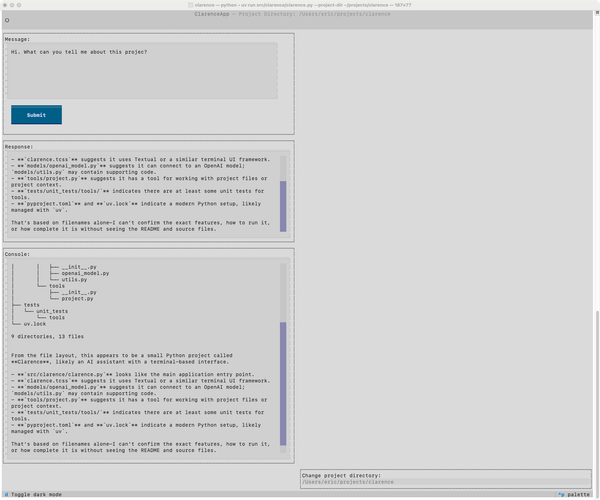
- Build a Textual app that lets you converse with any AI model over an API.
- Define a small set of tools that let the model interact with the files in a specific project directory. Focus on validation, just as we would for a web app.
- Use the tool to add a few features that make it more usable, such as recording some history and showing some useful information in the interface.
- Where do we go from here? This post will explore all the directions you could take a custom harness from this point.
- What are the conclusions? This final post will identify some of the takeaways from building a minimal custom harness. What does it tell us about mainstream harnesses? What does it suggest about modern development workflows?
I look forward to jumping into this. By the end of the next post, we'll have a working Textual app. :)