Teaching models vs real-world models

MP 176: They're often very different beasts.
I have a project I'm really excited about, and building it out past the proof-of-concept phase has me thinking about the difference between the code examples we tend to teach from, and the examples we end up using in real-world projects. The real-world versions tend to be much more complex, and reflect a lot of interesting aspects of a project.
I'm building a chess practice app; there are many great tools already available, but the one I'd like to use doesn't exist as far as I'm aware. In this post, we'll look at how a chess position was modeled in the earliest version of this project, what that model looks like currently, and what it might look like in the production version of the project.
Endgame practice
In chess, the endgame is the phase of the game where most of the pieces have been traded off. There are usually just the two kings, some pawns, and maybe a couple pieces. Rook-and-pawn and queen-and-pawn endings can look simple but are notoriously difficult to play accurately.
I love the endgame because even with just a few pieces on the board, you can still have rich and interesting positions that are quite challenging to play well. However, if you learn to play these positions accurately, there are a number of lasting benefits. You'll win more of your games that reach these kinds of positions, and you'll also build a much deeper understanding of how specific pieces interact. Learning the knight and bishop checkmate won't be relevant in many endgames because it just doesn't come up very often, but it will teach you a lot about how to use bishops and knights together more effectively.
There are plenty of tools for studying theoretical endgame positions. The tool I'm building focuses on endgame positions that arise from your own games. Here's one such position from one of my games earlier this year:
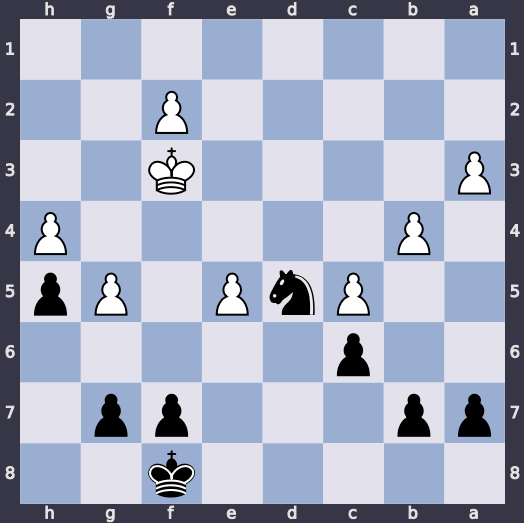
I was playing Black in this game, and it should have been an easy win from this position. I should be able to use my knight to pick off some pawns, convert one of my pawns to a queen, and win. But you have to be careful; White has plenty of pawns to work with and a more central King. There are many ways for White to win the knight or advance their own pawns enough to threaten a queen. I ended up losing this game, and wanted to practice this position until I could play it quickly and accurately.
The earliest Position model
Any chess app that focuses on specific positions is going to need to model those positions somehow. I'm building a Django project, so here's the earliest working version of my Position model:
class Position(models.Model):
    """An FEN position."""
    fen = models.CharField()
    date_added = models.DateTimeField(auto_now_add=True)

    def __str__(self):
        return self.fen
Even if you haven't worked with Django, and even if you're not a chess player, you can probably make some sense of this model. We're modeling a Position, and the class inherits from Django's base Model class. The core idea is to represent the position in Forsyth-Edwards Notation (FEN), a compact and unambiguous way to represent a chess position. Here's the FEN notation for the position shown earlier:
5k2/pp3pp1/2p5/2PnP1Pp/1P5P/P4K2/5P2/8 b - - 0 31
I won't explain this whole string, but you can pick out some of the relevant bits. This board is shown from Black's perspective, so it starts in the lower right corner. There are 5 empty squares, then the Black King, then two empty squares (5k2). The next rank has two Black pawns, followed by three empty squares, two more pawns, and one empty square (pp3pp1). This position occurred at move 31, with Black to play (b - - 0 31).
The model has one field, fen, for this string. It records the date the position was saved (date_added). If you're examining an instance of Position in a terminal or in an admin view, the __str__() method returns the FEN notation.
This was enough to get started. I could save and review positions, and display them on a screen. In introductory-level teaching examples, models often look like this. This kind of model is good for teaching, because if you're new to representing real-world things in code you want simplicity. Or if you're new to web frameworks and databases, you want to focus on a small amount of data. But real-world projects don't stay simple like this for long.
The current Position model
This project is still a ways from being ready for public usage, but the Position model has already evolved quite a bit. Here's the current state of the model:
class Position(models.Model):
    """An FEN position. Belongs to a chapter."""
    name = models.CharField()
    date_added = models.DateTimeField(auto_now_add=True)
    fen = models.CharField()
    owner = models.ForeignKey(settings.AUTH_USER_MODEL, on_delete=models.DB_CASCADE)

    # Positions are the main elements in chapters.
    chapter = models.ForeignKey(
        Chapter,
        on_delete=models.DB_CASCADE,
        null=True,
        blank=True,
    )
    # Or, a position can be a subposition of another position. This usually
    # happens when the user wants to focus on a position reached from another
    # position during an attempt.
    parent = models.ForeignKey(
        "self",
        on_delete=models.DB_CASCADE,
        null=True,
        blank=True,
        related_name="subpositions",
    )
    # If this is a subposition, and it comes from an attempt, record that connection.
    # Reverse relationship is the set of subpositions derived from that attempt.
    source_attempt = models.ForeignKey(
        "Attempt",
        on_delete=models.DB_SET_NULL,
        null=True,
        blank=True,
        related_name="derived_positions",
    )

    order = models.PositiveSmallIntegerField()
    orientation = models.CharField(
        choices=Orientation,
        default=Orientation.WHITE,
    )
    expected_result = models.CharField(
        choices=Result,
        default=Result.WHITE_WIN,
    )

    class Meta:
        ordering = ["order"]

        constraints = [
            models.CheckConstraint(
                condition=(
                    models.Q(chapter__isnull=False, parent__isnull=True)
                    | models.Q(chapter__isnull=True, parent__isnull=False)
                ),
                name="position_has_chapter_or_parent",
            )
        ]

    def __str__(self):
        return self.name

    @property
    def study(self):
        if self.chapter:
            return self.chapter.study
        return self.parent.study

    @property
    def is_subposition(self):
        if self.parent:
            return True
        return False

    def as_svg(self):
        """Return an SVG board rendering of the position."""
        board = chess.Board(self.fen)

        # In python-chess, White is True and Black is False.
        orientation = self.orientation == "white"
        colors = {
            "square light": "#e3e2ec",
            "square dark": "#99aed1",
            "margin": "#363646",
        }

        return chess.svg.board(board=board, orientation=orientation, colors=colors)

    def get_maia_url(self):
        """Return a URL to play this position against Maia."""
        url_maia = f"https://www.maiachess.com/play/maia?playType=againstMaia&player="
        url_maia += self.orientation
        url_maia += "&maiaVersion=maia_kdd_2600&timeControl=5%2B5&isBrain=false&sampleMoves=true&simulateMaiaTime=true&startFen="
        url_maia += quote_plus(self.fen)
        url_maia += "&returnTo=&challengeId=&forcedColor=&modalTitle=&modalSubtitle="

        return url_maia
I won't try to explain all this code, but I'll point out the things that can be done with an instance of Position at this point:
- Every position has a
name. The position in this post is named KN6p vs K7p. - Every position has an
owner. This makes it easy to query for all of a user's positions, and filter for the most recently added positions, or the most recently attempted positions. - A position can belong to a chapter, which is a collection of positions.
- A position can belong to another position (the
parentfield). For example, if a user is playing out a position, and they reach a position they'd like to study further, they can click a button and generate a newPositioninstance. The origin of every position can be traced, whether it was created from scratch or as a subposition. - The whole point of the practice app is to allow you to make a variety of attempts at winning (or drawing) a position. If a position came from an attempt, that attempt is stored in the
source_attemptfield. You can always review your attempts for a given position, and replay any of those attempts. - Positions have an
order, so they can be rearranged within a chapter. - Each position has an
orientation. Are we focusing on White's perspective, or Black's? - Every position has an
expected_result. Most of the time your goal in an endgame is to win. Sometimes it's not a winning position though, and your goal is to hold a draw against accurate play. - The
Meta.constraintsfield ensures that each position either belongs to achapteror aparentposition. - The
studyproperty returns the study that this position belongs to. This is a recursive function; when the current position is a subposition, it traces back through the parent positions until it finds the ancestor with a non-nullchapterfield. - Sometimes it's helpful to know if a position is a subposition, and the
is_subpositionproperty determines that. - We usually want to see positions represented as board diagrams, not FEN strings. The
as_svg()method returns an SVG image of the position. The board colors are hard coded for now, but they'll be customizable in a later version. - One of the ways you can attempt a position is by playing against Maia, a chess engine trained to mimic human behavior at various strength levels, instead of making the strongest possible moves. The
get_maia_url()method generates a link to play this position against Maia. For example, you can try your hand at playing the KN6p vs K7p position against the strongest Maia level. (This is one of the fun things about studying endgames; I'll probably never be able to beat Maia 2600 in a full game, but I can win from this position!)
That's the current state of the model; it's nowhere near finished, but it's also come a long way from something comparable to a standard introductory teaching example!
The production Position model?
I'm curious to see what the Position model will look like by the time this project is ready for public users. I know some people like to define their logic directly on the model, and some people like to keep their models small and put anything not directly related to the data in utility functions. I don't have strong opinions on that for now.
Most of what's currently in Position will probably stay in the class. The two things I'll probably move out to utility functions are the as_svg() method and the get_maia_url() method. Those are the two methods that are really acting on some data and returning something external, rather than returning something intrinsic to the Position model.
Conclusions
I really enjoy bouncing back and forth between teaching, writing, and working on real-world projects. Work in any one of these areas influences my thinking about the other areas. I'm curious to see where this particular project goes, and I'll be happy to share the production version of Position when it's seen some real-world use. It's already been helpful to me, so I think other people will be happy to use that app when it's ready.